Plus, in this edition: How consistent does email sending need to be? Why people click your email and then leave and Email authentication explained. Plus, much, much more ͏  ͏  ͏  ͏  ͏  ͏  ͏  ͏  ͏  ͏  ͏  ͏  ͏  ͏  ͏  ͏  ͏  ͏  ͏  ͏  ͏  ͏  ͏  ͏  ͏  ͏  ͏  ͏  ͏  ͏  ͏  ͏  ͏  ͏  ͏  ͏  ͏  ͏  ͏  ͏  ͏  ͏  ͏  ͏  ͏  ͏  ͏  ͏  ͏  ͏  ͏  ͏  ͏  ͏  ͏  ͏  ͏  ͏  ͏  ͏  ͏  ͏  ͏  ͏  ͏  ͏  ͏  ͏  ͏  ͏  ͏  ͏  ͏  ͏  ͏  ͏  ͏  ͏  ͏  ͏  ͏  ͏  ͏  ͏  ͏  ͏  ͏  ͏  ͏  ͏  ͏  ͏  ͏  ͏  ͏  ͏  ͏  ͏  ͏  ͏  ͏  ͏  ͏  ͏  ͏  ͏  ͏  ͏  ͏  ͏  ͏  ͏  ͏  ͏  ͏  ͏  ͏  ͏  ͏  ͏ ­ ­ ­ ­ ­ ­ ­ ­ ­ ­ ­ ­ ­ ­ ­ ­ ­ ­ ­ ­ ­ ­ ­ ­ ­ ­ ­ ­ ­ ­ ­ ­ ­ ­ ­ ­ ­ ­ ­ ­ ­ ­ ­ ­ ­ ­ ­ ­ ­ ­ ­ ­ ­ ­ ­ ­ ­ ­ ­ ­ ­ ­ ­ ­ ­ ­ ­ ­ ­ ­ ­ ­ ­ ­ ­ ­ ­ ­ ­ ­ ­ ­ ­ ­ ­ ­ ­ ­ ­ ­ ­ ­ ­ ­ ­ ­ ­ ­ ­ ­ ­ ­ ­ ­ ­ ­ ­ ­ ­ ­ ­ ­ ­ ­ ­ ­ ­ ­ ­ ­ ­ ­ ­ ­ ­ ­ ­ ­ ­ ­ ­ ­ ­ ­ ­ ­ ­ ­ ­ ­ ­ ­ ­ ­ ­ ­ ­ ­ ­ ­ ­ ­ ­ ­ ­ ­ ­ ­ ­ ­ ­ ­ ­ ­ ­ ­ ­ ­ ­ ­ ­ ­ ­ ­ ­ ­ ­ ­ ­ ­ ­ ­ ­ ­ ­ ­ ­ ­ ­ ­ ­ ­ ­ ­ ­  

> View all past editions here

If this email looks weird click here

rem@arkable (1000 x 300 px) (1)

In this edition:

→ NEW: Email metrics & measurement 

→ How consistent does email sending need to be? (scroll to blogs)

→ Why people click your email and then leave (scroll to inbox drop)

→ Email authentication explained (scroll to end)

H I Y A - how's it hanging? 


I ran my last masterclass and online training of the year this week.  The 2027 calendar needs planning because it's emptyyyy 


Somewhere around 8,000 marketers I've trained this year, which is CRAZY. 


You're my reason I do what I do 💘


So while I've got an empty diary and a planning spreadsheet open: what do you want me to cover in 2027? Reply and tell me. I'll build it.

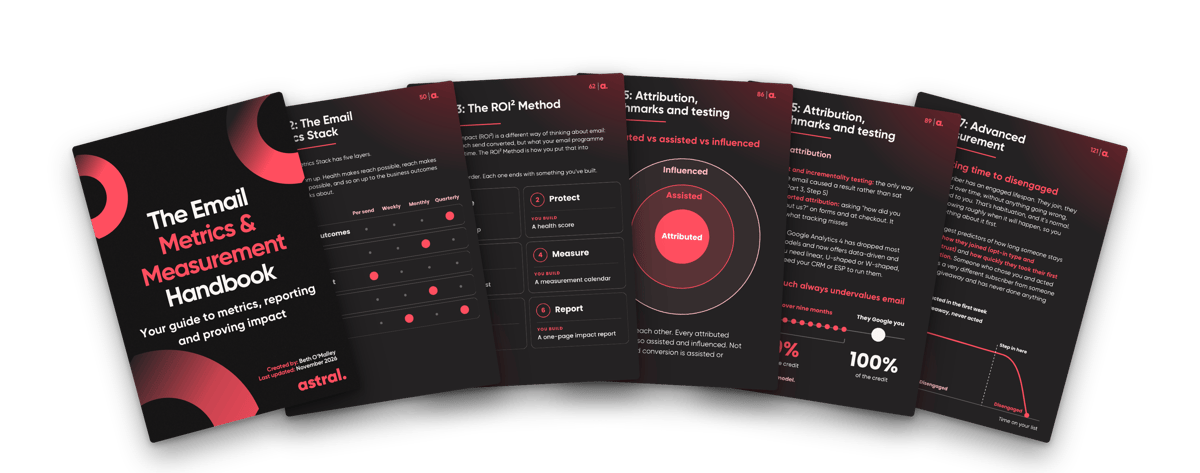
The Email Metrics & Measurement Handbook

140 pages on what to measure, what to ignore, and how to prove what email is doing.

Opens are inflated, clicks are under-reported, and the most valuable thing email does barely shows up on a dashboard at all!! 


You'll still be asked to justify email next year. This is what you use when you are.


What's in it:

  • Why opens can't be trusted, and why clicks are nearly dead
  • The Email Metrics Stack, every metric organised into five layers
  • The ROI² Method, six steps to measure and prove email's impact
  • How measurement changes for B2B and B2C
  • Attribution, and how to choose your model
  • How to report email and educate your stakeholders
  • Templates, checklists and scripts at the back
Metrics & Measurement Handbook →

NEW MASTERCLASS

Email Metrics & Measurement

I've turned the handbook above into the Email Metrics & Measurement Masterclass, running in February. B2B on the 18th, B2C, D2C and non-profit on the 24th.

How will this help me?

From the Vault

A blog a day keeps the spam filter away 

⌚ 4 min read:

→  How to get leadership to take email deliverability seriously

⌚ 3 min read:

→ SPF, DKIM and DMARC explained: the guide to email authentication

⌚ 5 min read:

→ How consistent does email sending need to be? Volume, gaps and warming explained

The Inbox Drop

Why people click your email and then leave

A click is a quick decision made on the strength of a promise.


If the page matches that promise, the decision feels confirmed. If it doesn't, the reader has to work out what went wrong, and leaving is the easiest way to end that discomfort.


That's message continuity


Email gets blamed because reporting stops at the click. So teams rewrite subject lines when the problem was on the page or the destination. 


What breaks it:

  • The subject line says one thing, the page headline says another
  • The link lands on a homepage instead of the actual content
  • A sign-in wall, or a form asking for data you already hold
  • The page doesn't work properly on a phone
  • The offer's expired or the item's gone
  • A confirmation page that says nothing about what just happened

DO THIS: 

Open your last three campaigns on your phone, in a private window.

For each one: does the page headline match the subject line? How many steps to reach the thing you promised? How many of those steps could you delete?


Quick fixes

  • Mirror the email's wording on the page. Same promise, same words.
  • Link deep, to the specific content, never the homepage.
  • Remove sign-ins where you can, and pre-fill what you already know.

  • One clear action per email.
READ: Message continuity →

Quick win for you

Email authentication explained

Three DNS records that prove mail claiming to come from you actually did.


Think of a letter at a sorting office:

  • SPF is the list of post offices allowed to frank mail in your name
  • DKIM is the wax seal that shows nobody opened it on the way
  • DMARC is the instruction on the envelope saying what to do if the frank or the seal doesn't match, plus a request for reports

Without all three, anyone can send email pretending to be you, and mailbox providers have no way of knowing the difference.


How to check it

Send yourself an email and open it in Gmail (or other providers). Click the three dots, then Show original.


You want to see PASS next to SPF, DKIM and DMARC.


For a proper look, run your domain through MXToolbox (free tool)


Three things that catch people out:

  • SPF has a ten lookup limit. Go over it and the check fails, often silently and not every time.
  • p=none gives you reports and no protection. Microsoft has started refusing mail from domains sitting on it.
  • Check every domain you own, including the ones you never send from. Those are the ones people spoof.

How to set it up

  1. List every system that sends email as you. Marketing platform, CRM, invoicing, support desk, that one tool somebody set up in 2019.
  2. Publish one SPF record covering all of them, under the ten lookup limit.
  3. Turn DKIM on in every platform, and verify each one afterwards.
  4. Publish DMARC at p=none with a reporting address. Read the reports for a few weeks.
  5. Fix or retire anything unauthorised, then move to quarantine, then reject.
GUIDE: Authentication explained →

Me + you 

2027 partnership

Upskilling your team, getting better email results, finally making sense of your data and a strategy that covers the 36 building blocks of email. 

Enquire about working with me in 2027 →
Beth headshot final

See you next week, same time, same strong feelings about email.


See you next week!! 


Beth ✌️

I have ADHD (IFYKYK) so please excuse any typos and spelling errors in this email.

a. final  (1)

What did you think about this email?

Click here to send some feedback - takes 30 secs

Know someone who needs this in their inbox? Send them here.

Astral Digital, 85 Great Portland Street, First Floor, London, Central London, W1W 7LT 

Unsubscribe from RE:markable here